
Website accessibility is becoming a critical part of modern web development. Businesses must ensure that their websites are usable for everyone, including people with disabilities.
An ADA website compliance follows accessibility standards that allow users with visual, hearing, cognitive, or motor disabilities to access and interact with content easily.
Beyond legal compliance, accessibility also improves SEO, user experience, and customer reach. In this guide, we’ll explore how businesses can make their websites ADA and accessibility compliant.
What Is ADA Website Compliance?
ADA stands for the Americans with Disabilities Act, which requires businesses to provide equal access to services, including digital platforms.
For websites, accessibility standards are mainly defined by the Web Content Accessibility Guidelines (WCAG).
You can review the official accessibility guidelines here:
https://www.w3.org/WAI/standards-guidelines/wcag/
These guidelines help ensure websites are:
- Perceivable
- Operable
- Understandable
- Robust
Following these principles makes websites usable for a wider audience.
Why Website Accessibility Matters for Businesses
Accessible websites benefit both users and businesses.
Key benefits include:
- Better user experience for all visitors
- Improved SEO rankings
- Wider audience reach
- Reduced legal risks
- Increased customer trust
Many accessibility improvements also enhance performance. For example, faster loading websites improve usability for everyone. If you want to learn more about this, read How Website Speed Impacts SEO & Conversions.
Accessibility is also closely connected with good design practices. Businesses that prioritize accessibility often follow principles explained in First Impression Matters: Website Design for Businesses (2026).
Add Alternative Text for Images
Alt text helps screen readers describe images to visually impaired users.
For example, instead of writing:
“image1.jpg”
Use descriptive text like:
“Business team working on website development project.”
This allows screen reader tools to explain the image content.
Google also uses alt text to understand images, which can improve SEO.
Learn more about image accessibility here:
https://webaim.org/techniques/alttext/
Ensure Proper Color Contrast
Many users have visual impairments or color blindness. Poor contrast between text and background can make content difficult to read.
Accessibility best practices include:
- Dark text on light backgrounds
- High contrast color combinations
- Avoiding color-only instructions
Tools like contrast checkers help verify readability.
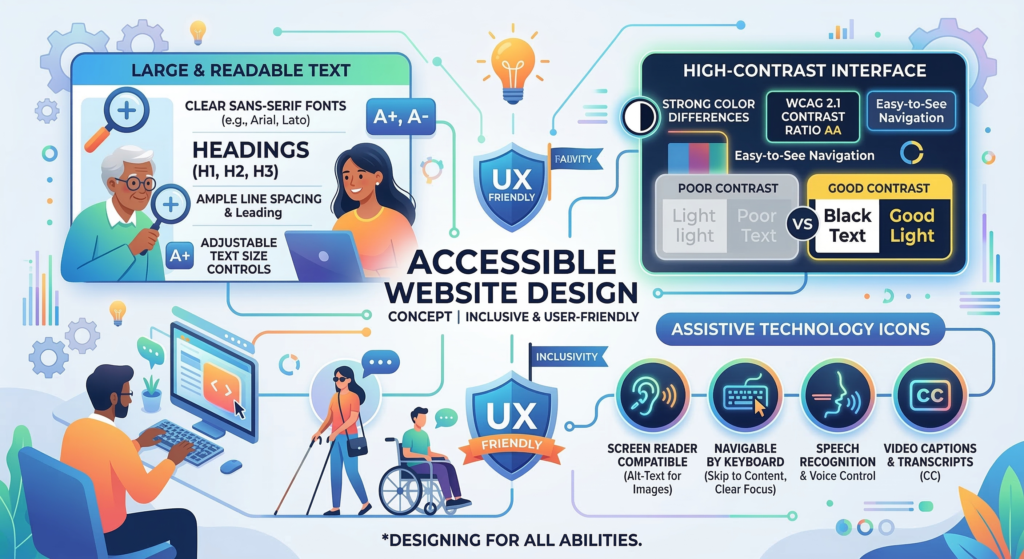
Make Your Website Keyboard Accessible
Some users cannot use a mouse and rely on keyboards or assistive technologies.
Your website should allow users to navigate through:
- Menus
- Forms
- Buttons
- Links
using only the keyboard.
Important accessibility features include:
- Visible focus indicators
- Logical navigation order
- Skip-to-content links
Add Captions and Transcripts for Media
Videos and audio content should include captions or transcripts for users with hearing impairments.
Captions allow users to understand video content without sound, while transcripts provide text versions of audio.
You can learn about caption accessibility standards here:
https://www.w3.org/WAI/media/av/
Use Clear Website Structure
A well-structured website helps assistive technologies understand content hierarchy.
Best practices include:
- Using proper heading structure (H1, H2, H3)
- Adding descriptive link text
- Organizing content logically
Structured websites also perform better in search engines.
Avoid common design mistakes by reading Common Website Design Mistakes That Hurt SEO in 2026.
Optimize Forms for Accessibility
Forms are critical for contact pages, sign-ups, and purchases.
Accessible forms should include:
- Clear labels for each field
- Error messages that explain problems
- Simple instructions
- Keyboard navigation support
Well-designed forms improve both accessibility and lead generation.
Businesses using optimized websites for conversions can also benefit from strategies in Website Development for Lead Generation: Best Practices.
Test Your Website Accessibility
Testing is essential to ensure your website meets accessibility standards.
You can use tools like:
These tools identify accessibility issues and provide suggestions for improvement.
Manual testing with screen readers is also recommended.
Why Professional Website Development Matters
Accessibility compliance often requires technical adjustments in website design, development, and structure.
Professional developers can ensure:
- WCAG-compliant design
- Accessible navigation
- Optimized code structure
- Compatibility with assistive technologies
Businesses that invest in professional Website Development Services can create websites that are accessible, SEO-friendly, and conversion-focused.
Conclusion
Making your website ADA and accessibility compliant is essential for creating an inclusive digital experience. Accessible websites help people with disabilities interact with your content while also improving SEO and user experience.
By following accessibility best practices, including alt text, proper structure, keyboard navigation, and media captions, businesses can create websites that serve a wider audience and build stronger trust online.
In 2026 and beyond, accessibility is not just a legal requirement; it is a key component of modern website development.
FAQs
What is ADA website compliance?
ADA website compliance means designing websites so they are accessible to people with disabilities according to accessibility standards like WCAG.
Does website accessibility improve SEO?
Yes. Accessibility improvements such as proper structure, alt text, and better usability often improve SEO rankings.
How can I check if my website is accessible?
You can test accessibility using tools like WAVE, Lighthouse, or Accessibility Insights.
Is ADA compliance required for all websites?
While regulations vary by region, many businesses adopt accessibility standards to avoid legal risks and improve user experience.